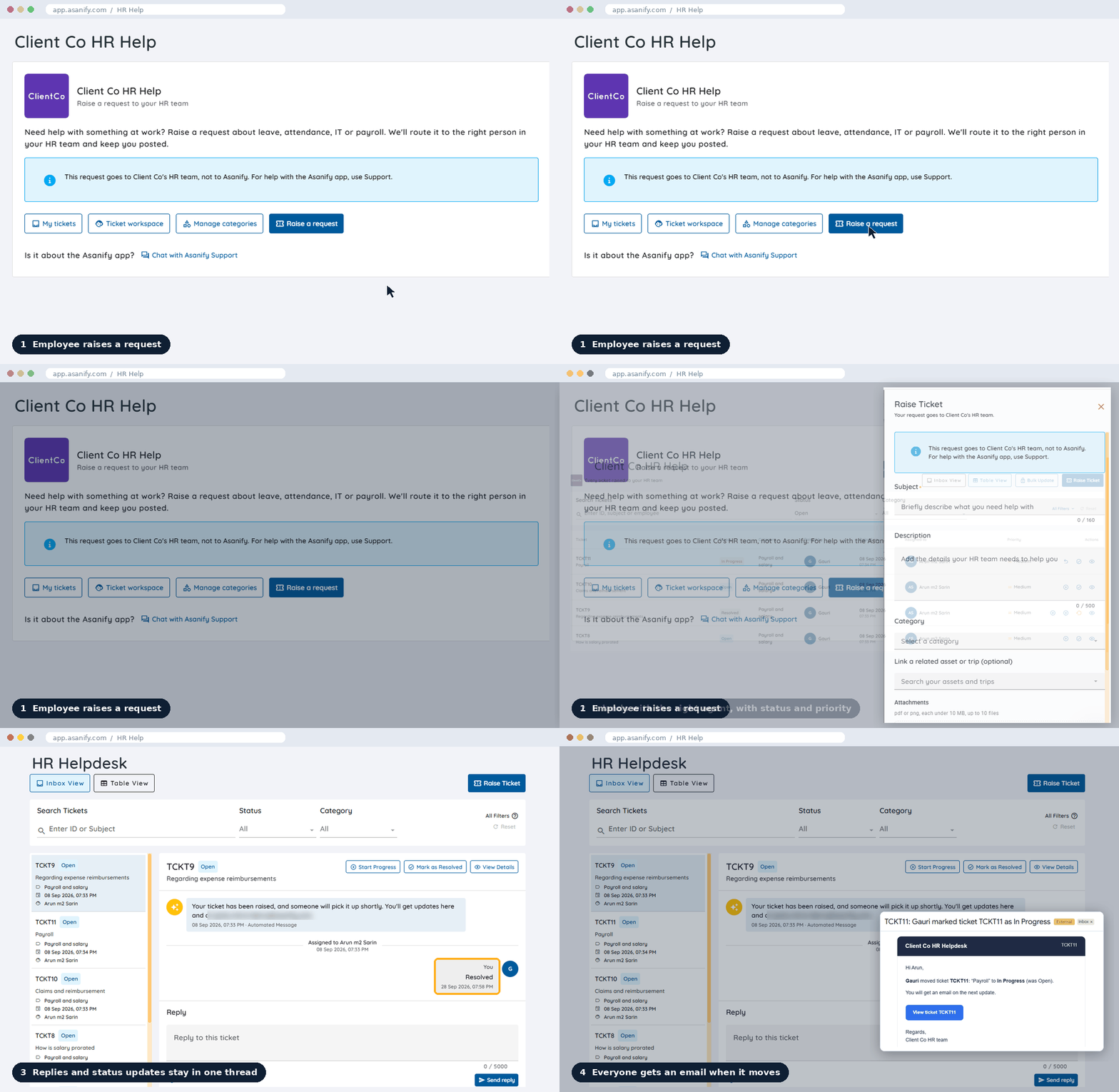
Asanify’s HR helpdesk software gives every employee one place to raise a request, from a laptop that won’t start to a question about leave. HR, Finance, Legal, IT and Admin pick it up as a ticket, and everyone can see exactly where it stands.
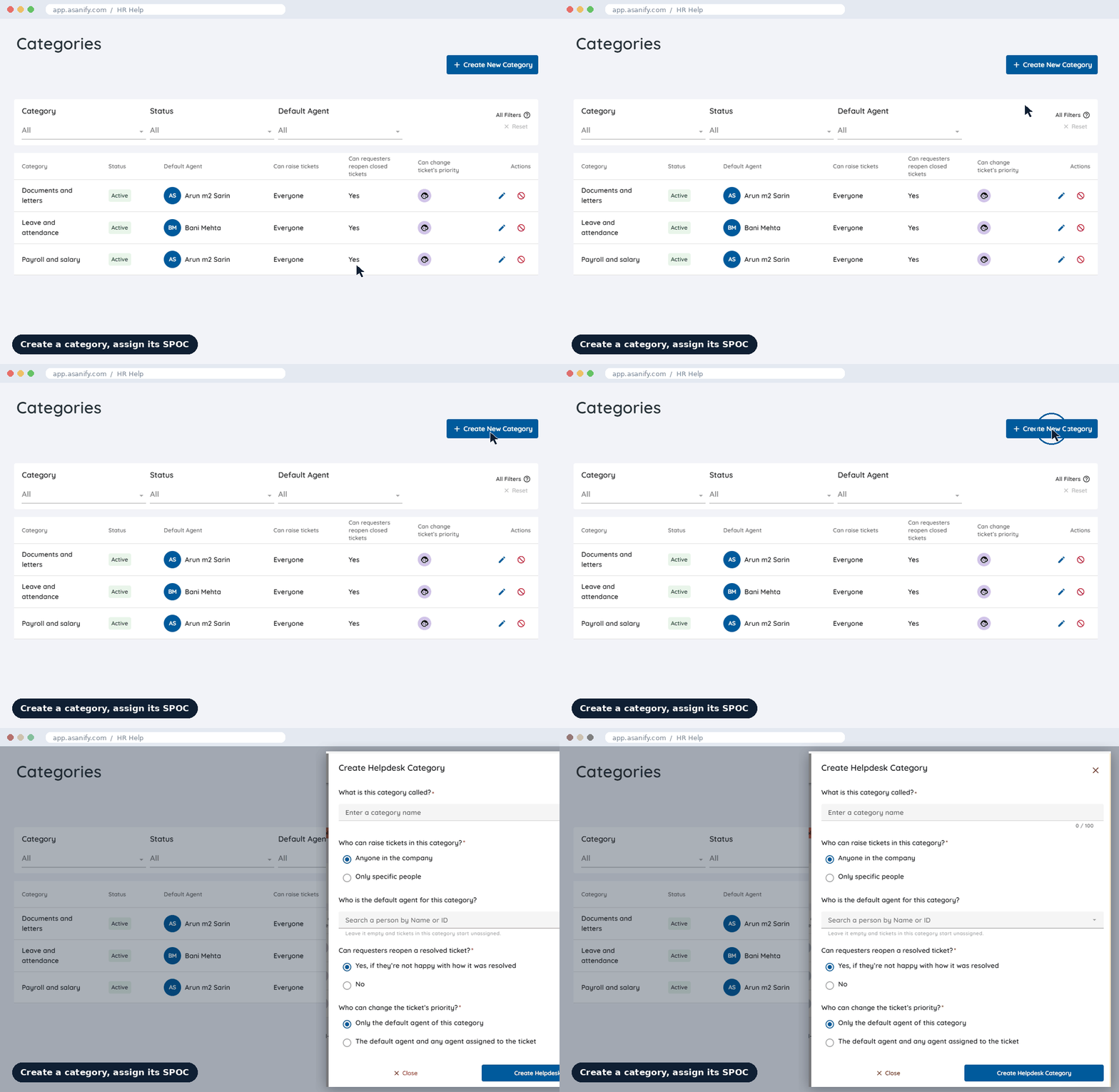
You decide how requests flow. Create a ticket category for each team, give each one a SPOC, and set the rules, so every HR case lands with the right person from day one.
Categories for every team
Payroll, IT, Legal, Admin: set up whatever your company needs.
A SPOC for each category
Every ticket goes straight to that category's default agent. No manual forwarding.
Your rules, per category
Who can raise tickets, whether employees can reopen a resolved one, and who can change priority.
One helpdesk per company
Every company in your group gets its own.
Recognized Globally: Ranked #1 for ‘Ease of Use’ & ‘Customer Support’
Connected to the rest of Asanify
Every ticket arrives with its context
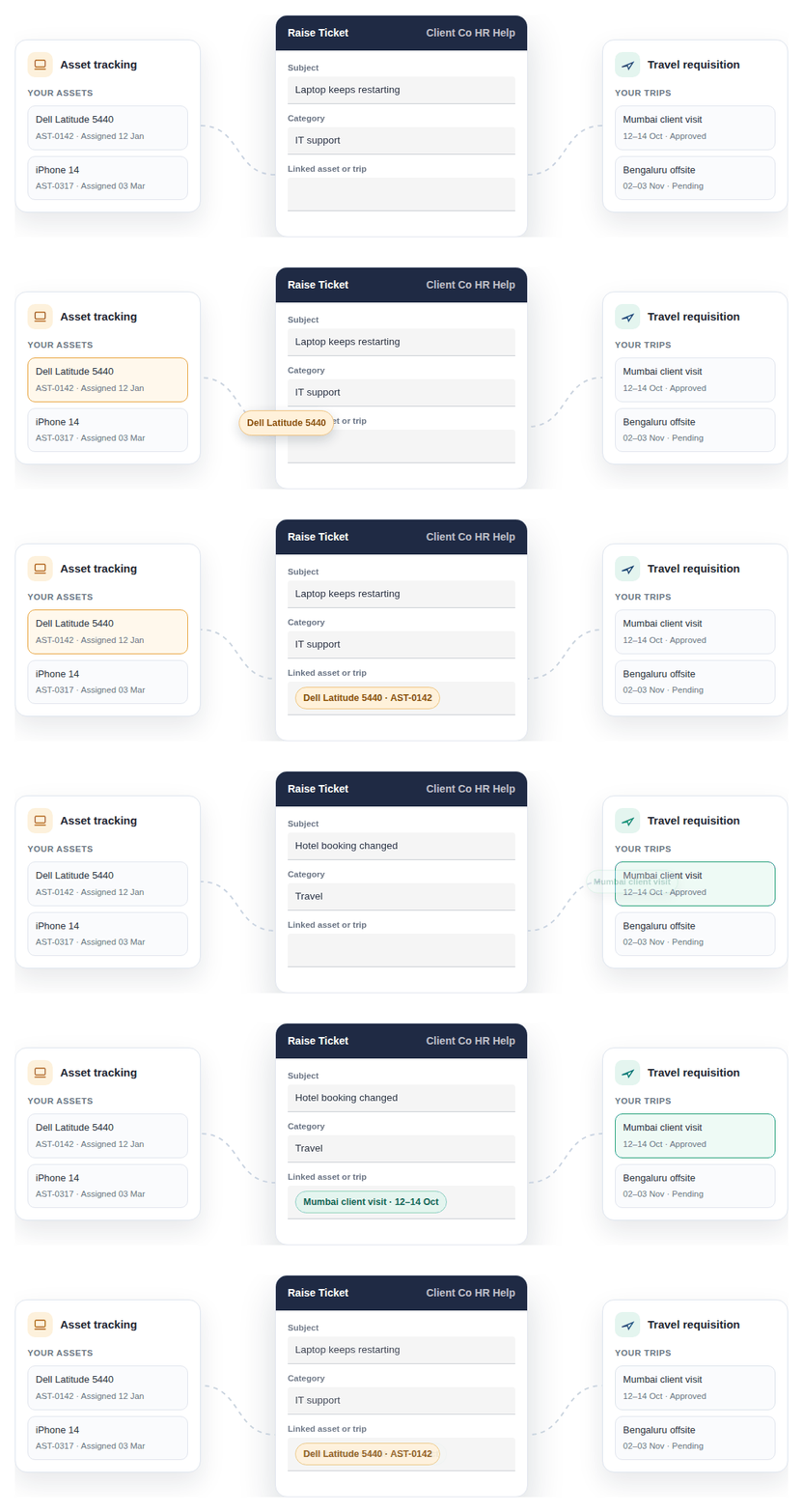
Because the helpdesk is built into Asanify’s HRMS, employees can link the asset or trip a ticket is about. Agents see the details straight away, with no back-and-forth to find them.
Asset tracking. A laptop or phone issue arrives with the exact device attached.
Travel requisition. A travel query arrives with the trip, its dates and status.
For employees
Ask once. Always know where it stands.
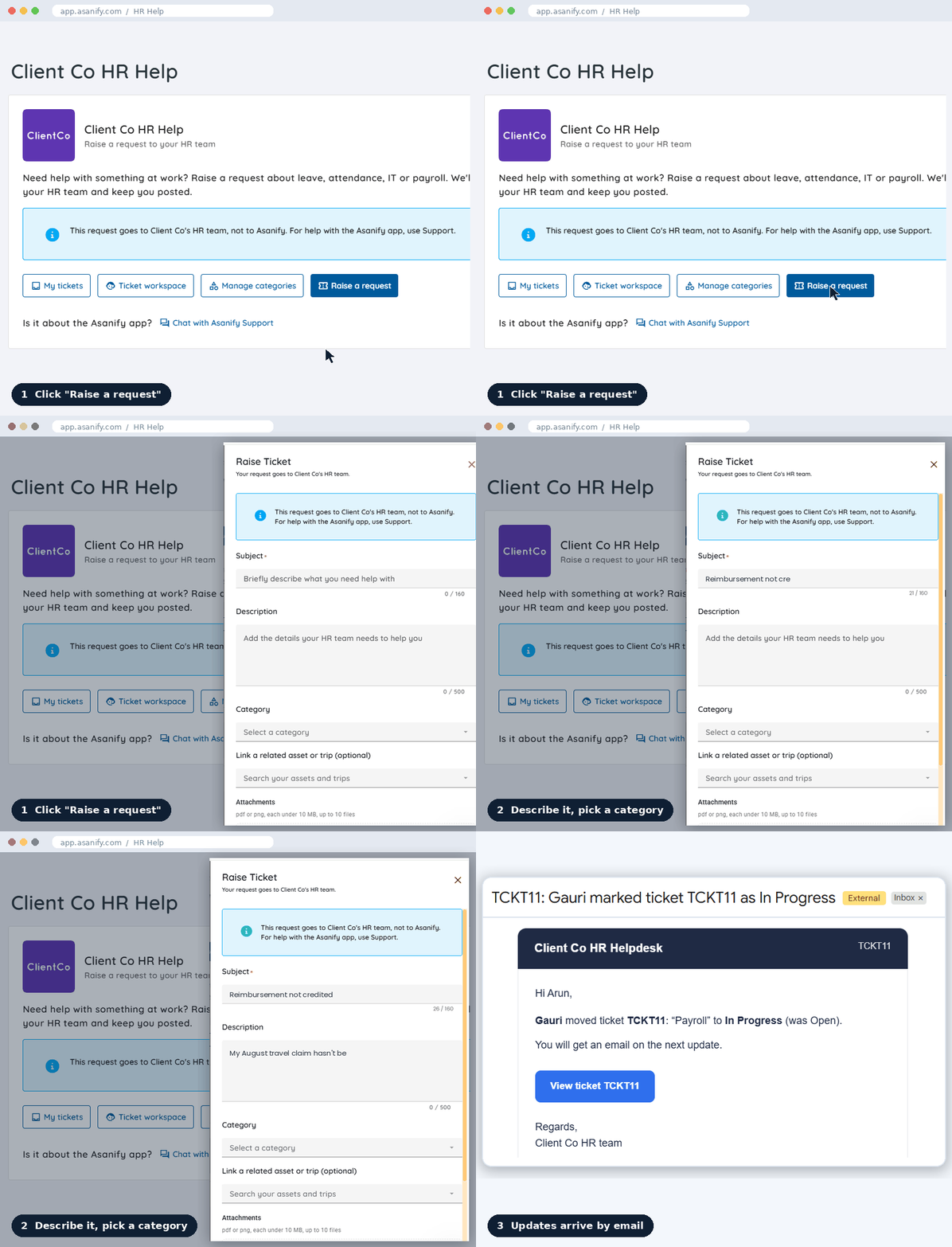
One employee helpdesk for every request
Payroll, a contract query, a broken laptop: all raised from the same place.
Raise and track from your phone
Everything works in the Asanify mobile app, not just on a desktop.
Updates without asking
Status changes show up in the thread, and email notifications keep everyone informed.
Know who owns it
See the assignee, when it was raised, the last update and the full history.
For every department
One HR service desk where every team sees the full picture
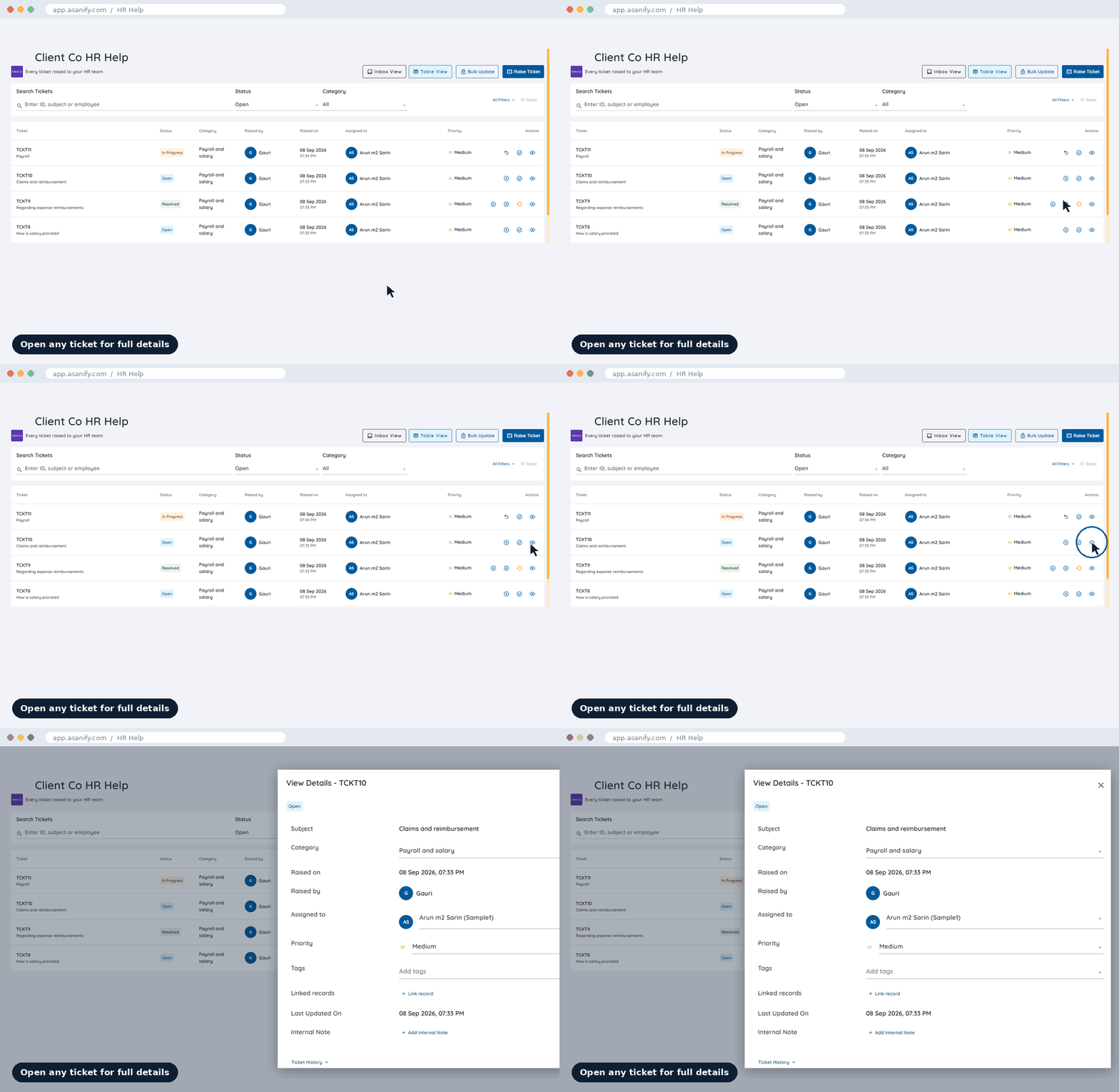
Every ticket in one workspace
A table for triage at volume, an inbox view for working through replies.
Find any ticket in seconds
Search by ticket ID, subject or employee name while they're still on the line.
Full visibility on every step
Status, priority, owner, linked records and history on every ticket.
Talk to the employee directly
Reply to the person who raised it, right in the ticket, so questions get answered and tickets close faster.
Built-in accountability
Every request on record, with a full audit trail
Full ticket history
Who picked it up, when it moved and when it closed, in one timeline.
Every reopen is explained
Reopening a ticket needs a reason, so repeat issues are visible.
Closed means closed
A closed ticket can't take new replies until it's reopened.
Context stays with the ticket
Replies, attachments and internal notes all live in one place.
One helpdesk, every team
One internal helpdesk for HR, Finance, Legal, IT and Admin
Whatever an employee needs from a team at work, it goes through the same employee helpdesk.
HR
Leave, attendance and letters, handled in the open instead of over email.
Clarity on leave balance
Experience letter
Attendance correction
HR Help · My tickets
In Progress
TCKT14
In Progress
Clarity on leave balance
Leave and attendance
29 Sep 2026, 10:12 AM
Bani Mehta
My balance shows 4 days, I expected 6. Can you check?
Assigned to Bani Mehta
Two days were used on 14 Aug. Sharing the statement now.
Finance
Payslip and reimbursement questions reach Finance with the proof already attached.
Reimbursement status
Payslip query
Tax proof submission
HR Help · My tickets
Resolved
TCKT9
Resolved
Regarding expense reimbursements
Payroll and salary
08 Sep 2026, 07:33 PM
Arun m2 Sarin
My August travel claim hasn’t been credited yet.
Assigned to Arun m2 Sarin
Approved. It will be credited with the September salary.
Legal
Contract and document requests get an owner and a record, not a forwarded email chain.
Contract query
NDA request
Document review
HR Help · My tickets
Open
TCKT16
Open
NDA for new vendor
Legal and contracts
29 Sep 2026, 04:40 PM
Unassigned
We need an NDA signed before Friday’s vendor call.
Assigned to Unassigned
Please share the vendor’s legal name and address.
IT
Broken laptops and access requests land in IT’s queue with photos and details included.
Laptop not working
System access
Software install
HR Help · My tickets
In Progress
TCKT12
In Progress
Laptop not turning on
IT support
28 Sep 2026, 09:12 AM
IT SPOC
It won’t power on since this morning. Photo attached.
Assigned to IT SPOC
Replacing the charger now. Please collect a loaner from the IT desk.
Admin
Everyday office requests are tracked from ask to done.
ID card
Desk request
Courier
HR Help · My tickets
Open
TCKT18
Open
Replacement ID card
Office and facilities
30 Sep 2026, 11:05 AM
Admin SPOC
Lost my ID card on the way in today.
Assigned to Admin SPOC
Your new card will be ready at reception tomorrow.
Categories are yours to define, so the helpdesk fits how your company already works.
HR helpdesk software vs email: why teams switch
Asanify Helpdesk
Email and chat
Where requests go
One portal, straight to the category’s SPOC
Whoever the employee happens to message
Status
Visible to the employee at every step
Only if someone replies
History
Full timeline on the ticket
Buried in threads, lost when people leave
Context
Tied to the employee record, assets and trips
Typed out again each time
FAQ
HR helpdesk software: frequently asked questions
What is HR helpdesk software?
HR helpdesk software gives employees one place to raise HR and workplace requests as tickets, and gives HR and other teams one place to track, answer and close them. Asanify HR Helpdesk routes each ticket to the right owner, keeps every reply in one thread and shows the employee its status at every step.
What is an HR ticketing system, and why use one instead of email?
An HR ticketing system turns each employee request into a ticket with an owner, a status and a full history. Unlike email, requests don’t sit in one person’s inbox, employees don’t have to chase for updates, and the record stays with the company when people leave.
Is Asanify HR Helpdesk part of the Asanify HRMS?
Yes. The helpdesk is built into the Asanify HRMS, so every ticket is tied to the employee record. Employees can also link a ticket to an asset from Asset tracking or a trip from Travel requisition, so agents get the context straight away.
Who picks up the tickets?
Each category has a SPOC, its default agent. New tickets in that category go straight to them. You can leave a category without a SPOC, and its tickets start unassigned.
Can teams other than HR use the helpdesk?
Yes. Finance, Legal, IT, Admin and any other team that handles employee requests can work tickets in the same helpdesk.
Can we control who raises tickets in a category?
Yes. Each category can be open to everyone in the company or only to specific people.
Can employees reopen a ticket?
If you allow it for that category. Admins decide per category whether employees can reopen a resolved ticket.
How do employees know when something changes?
Every status change shows up in the ticket thread, and email notifications keep employees and teams updated as tickets move.
Can employees raise and track requests on mobile?
Yes, in the Asanify mobile app.
We have several companies in our group. Can each have its own helpdesk?
Yes. Each company in your Asanify portal gets its own helpdesk.
Give every employee one place to ask, and every team one place to answer.