Employee rewards and recognition software

Rewards & Recognition is core to people management

Asanify makes recognition part of every workday, tied to your company values and backed by redeemable points.

Book a Meeting Now

Trusted by top companies around the Globe

Recognized Globally: Ranked #1 for ‘Ease of Use’ & ‘Customer Support’

G2 Leader badge for Asanify
G2 High Performer badge for Asanify
G2 Best Support badge for Asanify
G2 Easiest To Use badge for Asanify
G2 Fastest Implementation badge for Asanify
G2 High Performer Small Business badge for Asanify
Software Advice rating for Asanify
Google rating for Asanify
Capterra rating for Asanify
How it works

Recognition that runs itself, from your values to real rewards

HR sets the values and rules once. Employees recognise each other on the Feed, earn points and redeem them, and HR sees the impact.

See recognition run on your own company values

A 30-minute walkthrough with your programs, values and points.

Recognise on the Feed

Recognition happens in the Feed, where the whole company sees it

Recognition takes a few clicks

Pick the program, the people and what they did, right from the Feed.

Every recognition reinforces a company value

Each one carries one your company values, passing on the company culture.

Keep it public or private, your call

Share it on the Feed, or keep it to the people involved and admins.

Points

Points make recognition tangible. Budgets keep it sustainable.

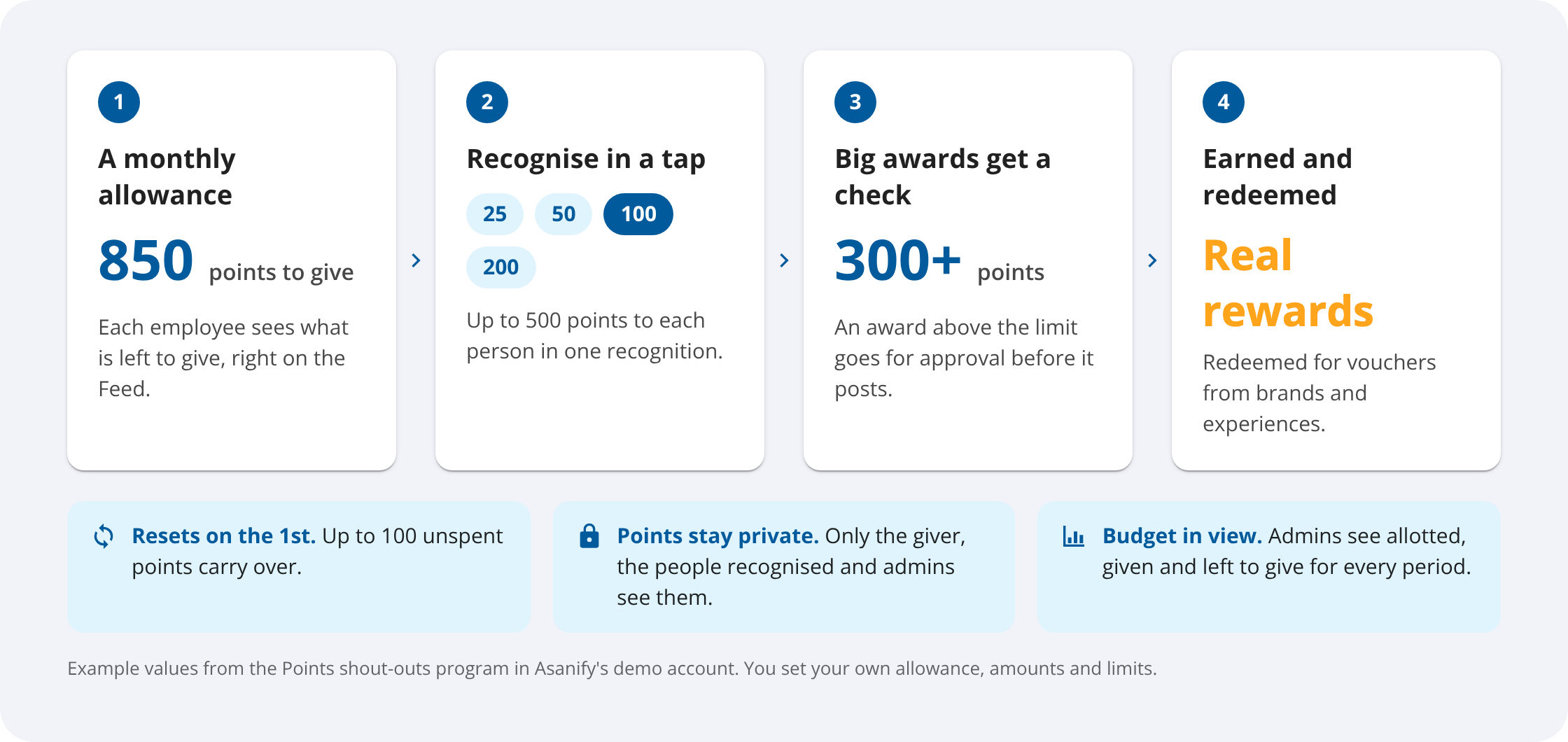
Every employee gets an allowance to give. Limits, approvals and carry-over are built in, and earned points are redeemed for vouchers.

How points work in Asanify: monthly allowance to give, quick amounts, approval above a limit, and earned points redeemed for vouchers from brands and experiences

Put a recognition budget to work

We will set up an allowance, limits and approvals with you, live.

My points

Employees see every point they earn, and exactly where it came from

Left to give, always in view

The Your points card on the Feed shows this month's balance and when it resets.

Earned points add up

They build up in their own balance, ready to redeem for vouchers.

Every recognition on record

Badges, certificates and every point received or given, in the Recognitions tab of the profile.

Programs, values and badges

HR sets the rules once. Recognition runs on its own.

A program for every kind of recognition

Peer shout-outs, manager spotlights and spot awards, each with who can recognise, who it is for and who sees it.

Your values, in your order

Add, reorder or retire company values. Givers see them in the order you set.

Badges with a certificate

Award a badge to several people at once. Each person gets their own certificate, a bell and an email.

Bring your company values into every workday

We will load your values and a first program in the demo.

Milestones

Birthdays and work anniversaries are rewarded automatically, on the day

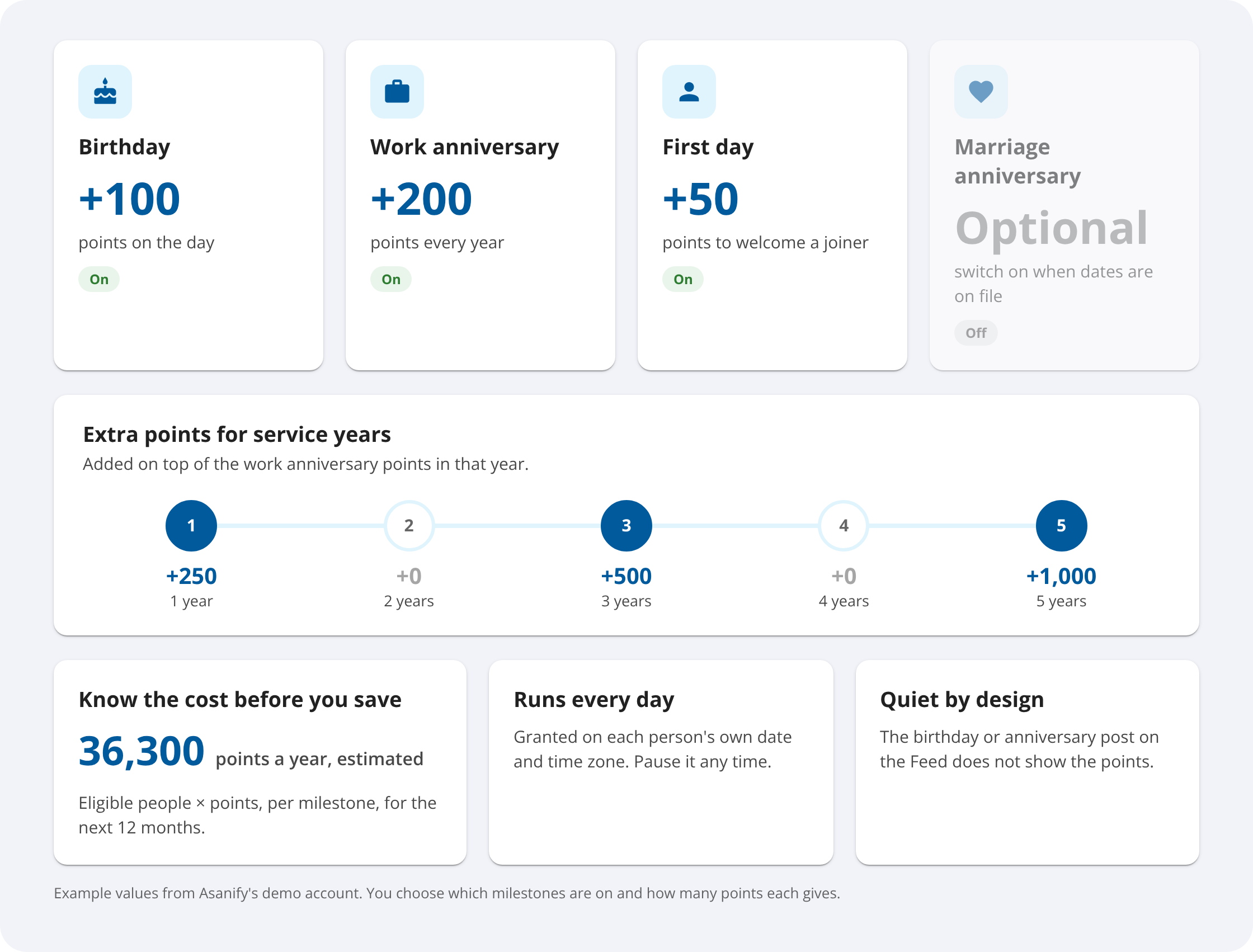
Choose the milestones and the points. Asanify grants them on the day and shows the yearly cost before you save.

Asanify milestones: automatic points for birthdays, work anniversaries, first days and service years
Adoption

HR sees who is recognised, and who is being missed

Participation at a glance

The share of people who gave and received recognition, by manager's team and by value.

The people nobody has recognised, surfaced

A 90-day view by department, location or tenure, with a Recognise button next to each name.

Every point accounted for

Allotted, given and left to give for each program and period, with top givers and a CSV download.

Managers get a monthly nudge

On the 1st of each month, a reminder goes to any manager who has not recognised their team in 30 days.

Moderation and points history

HR stays in control without slowing recognition down

Every recognition in one list

Private ones included, filtered by status, visibility, program and date.

Anything off-brand comes down in one click

Take a post off the Feed for everyone.

Every point on record

Adjust points when you need to, such as for a hackathon prize, and download the full history as CSV.

Recognition your HR team can stand behind

See moderation, privacy and reporting on your own data.

Fair and private

Recognition employees trust, because no one is singled out

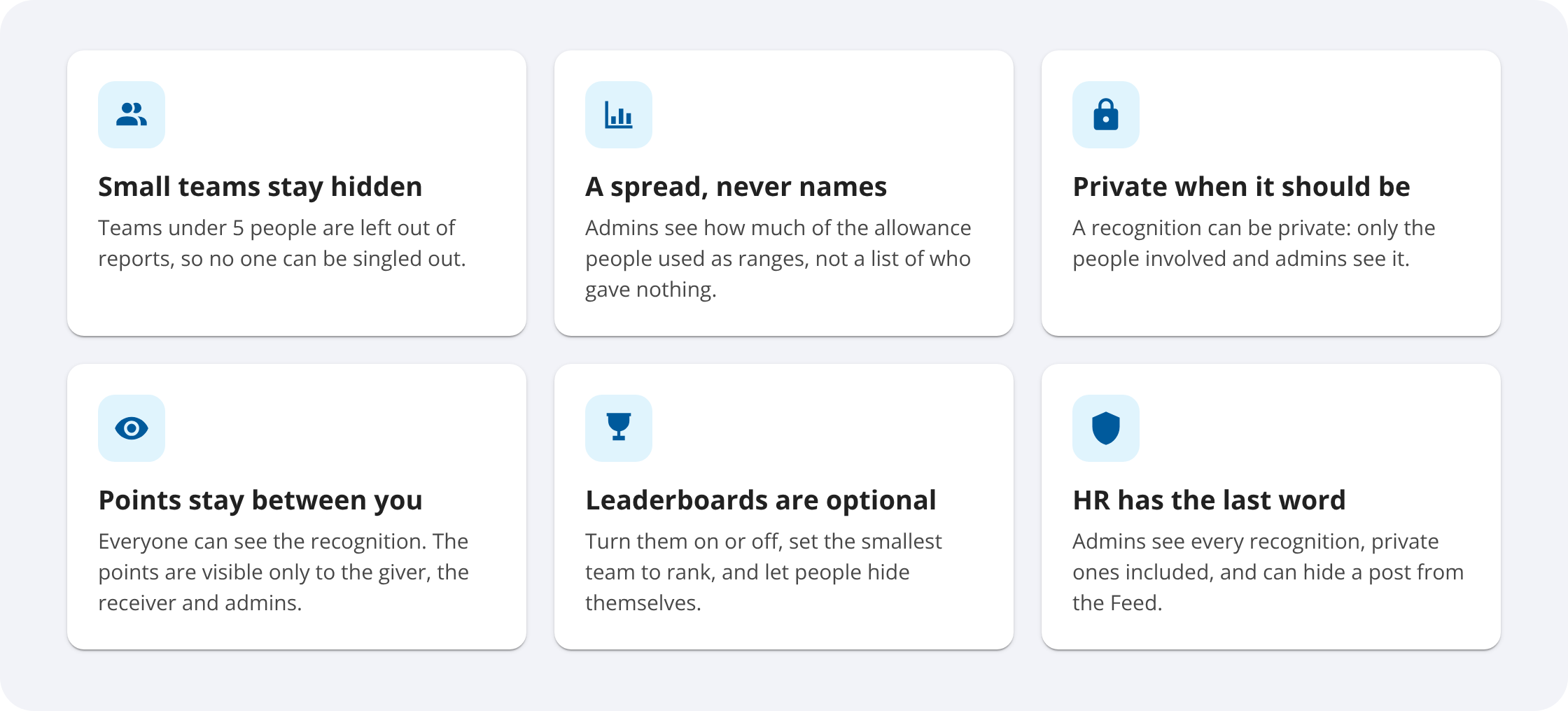
Every safeguard below is a setting or rule in the product today.

Fair and private recognition in Asanify: small teams hidden from reports, private recognitions and admin moderation
What's included

Everything in Asanify Rewards and Recognition

Recognition on the Feed

Pick the people, one to five values and a message, shared or private.

Points with guardrails

Monthly allowances, quick amounts, per-person limits, approvals and carry-over.

Redeemable rewards

Earned points redeemed for vouchers from brands and experiences.

Badges and certificates

Admin awards, each person with their own certificate.

Automatic milestone points

Birthdays, work anniversaries, first days and extra points for service years.

Adoption reports

By team, value, department, location and tenure, with CSV downloads.

HR, payroll and recognition in one system

No separate rewards tool to buy, learn or keep in sync.

Compare

Asanify vs email and chat, and a separate rewards tool

Asanify
Email and chat
Separate rewards tool
Recognition where people already are

On the Feed, inside your HRMS

Lost in threads and inboxes

Another app to open and log in to

Tied to company values

One to five values on every recognition

Not tracked

Values set up again in a second system

Points inside a budget

Allowances, limits and approvals, with points redeemed for vouchers

Not possible

A separate budget to fund and reconcile

Birthdays and anniversaries

Points granted on the day from employee records

Someone keeps a calendar

Needs employee data synced from HR

Who is being missed

90-day view by team, department and tenure

No visibility

Reports apart from your HR data

●  SOC 2 Type II certified
●  ISO 27001:2022 certified
●  GDPR compliant
●  India DPDP Act compliant
●  Indonesia PDP Law compliant
FAQ

Rewards and recognition questions HR teams ask

What is employee rewards and recognition software?

It gives employees one place to recognise each other in public, tie every recognition to company values and back it with points they can redeem. HR sets the rules once and sees who is being recognised and who is being missed.

From the Feed on the home page, they click Recognise a colleague, pick a program, choose the people, pick one to five company values and say what the person did. If the program gives points, they add points too. The recognition goes to the Feed for everyone, or stays private if they turn sharing off.

Yes. Each program sets who can recognise: anyone to anyone, or managers only. A program can also be limited to one entity, and set to share new recognitions with everyone or keep them private by default.

Each employee gets an allowance to give in a period, such as a month. They pick a quick amount or type one in, up to a limit per person, and an award above a set total goes for approval. Unspent points can carry over up to a limit, and the allowance resets at the start of the next period.

Employees redeem their earned points for gift vouchers from a catalogue of brands and experiences.

The recognition is visible to whoever it is shared with. The points are visible only to the giver, the people recognised and admins.

Yes. Turn on milestones for birthdays, work anniversaries, first days and marriage anniversaries, set the points for each and add extra points for service years. Asanify grants them on the day in each person’s time zone and shows the estimated yearly total before you save.

Badges are awards that admins give, such as Customer Hero or Rising Star. One badge can go to several people at once, each person gets their own certificate, and HR chooses to post it publicly, privately or not at all.

The Adoption tab shows the share of people who gave and received recognition, results by manager’s team and by value, points allotted, given and left, and who has not been recognised in 90 days. Teams under 5 people are left out so no one is singled out.

Yes. Company admins and HR admins see every recognition, private ones included, in Moderation and can hide one from the Feed for everyone. Hiding cannot be undone.

Make recognition a daily habit, not an annual event.